
When Wyse ThinClients (in my case V10LE) are used for remote connections with a PNLiteServer, grey borders will appear if the resolution of the ThinClients screens are set to 1280x1024:
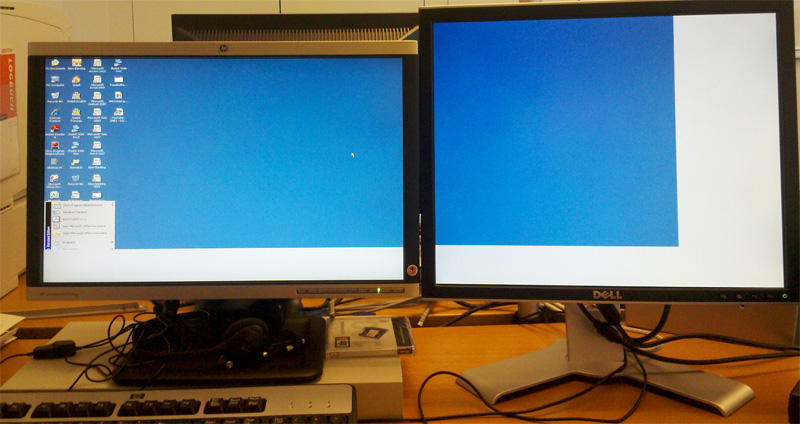
This is not only ugly, it also covers the whole taskbar and is therefore not usuable. For some funny reason, the cause of this problem has nothing to do with the ThinClient's neither the Citrix server's resolution. Even if the PublishedDesktop Application is set to match the correct resolution, the grey borders appear.
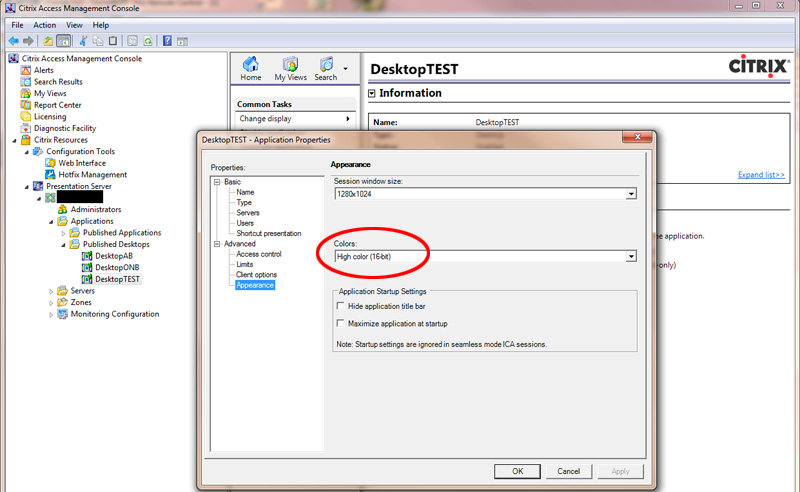
The reason for this grey border is the color depth (not resolution!) defined in the Citrix Application properties. Changing the color depth to 16bit did the job and the full screen connection on dual screens worked as it should:
No comments yet.

AWS Android Ansible Apache Apple Atlassian BSD Backup Bash Bluecoat CMS Chef Cloud Coding Consul Containers CouchDB DB DNS Database Databases Docker ELK Elasticsearch Filebeat FreeBSD Galera Git GlusterFS Grafana Graphics HAProxy HTML Hacks Hardware Icinga Icingaweb Icingaweb2 Influx Internet Java KVM Kibana Kodi Kubernetes LVM LXC Linux Logstash Mac Macintosh Mail MariaDB Minio MongoDB Monitoring Multimedia MySQL NFS Nagios Network Nginx OSSEC OTRS Office PGSQL PHP Perl Personal PostgreSQL Postgres PowerDNS Proxmox Proxy Python Rancher Rant Redis Roundcube SSL Samba Seafile Security Shell SmartOS Solaris Surveillance Systemd TLS Tomcat Ubuntu Unix VMWare VMware Varnish Virtualization Windows Wireless Wordpress Wyse ZFS Zoneminder