
Today I noticed that my beloved Firefox browser started to cut off the web address (more precisely the HTTP request method) in the address bar since I recently upgraded to Firefox 7.
This is how it looks:
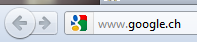
When being connected to an SSL secured website, the https:// is still shown:

Maybe I'm nostalgic or whatever, but I still want the http:// to be shown there, like it is shown on https sites.
To re-enable this, a setting in the Firefox config needs to be changed.
In
the address bar enter "about:config", as if you wanted to access a
website. Then click on the "I'll be careful, I promise" button.
The important setting here to change is the following:

Double-click on the "browser.urlbar.trimURLs" row and it will change the value to false (and it will become bold).
From now on the address bar shows the http:// again:

No comments yet.

AWS Android Ansible Apache Apple Atlassian BSD Backup Bash Bluecoat CMS Chef Cloud Coding Consul Containers CouchDB DB DNS Database Databases Docker ELK Elasticsearch Filebeat FreeBSD Galera Git GlusterFS Grafana Graphics HAProxy HTML Hacks Hardware Icinga Icingaweb Icingaweb2 Influx Internet Java KVM Kibana Kodi Kubernetes LVM LXC Linux Logstash Mac Macintosh Mail MariaDB Minio MongoDB Monitoring Multimedia MySQL NFS Nagios Network Nginx OSSEC OTRS Office PGSQL PHP Perl Personal PostgreSQL Postgres PowerDNS Proxmox Proxy Python Rancher Rant Redis Roundcube SSL Samba Seafile Security Shell SmartOS Solaris Surveillance Systemd TLS Tomcat Ubuntu Unix VMWare VMware Varnish Virtualization Windows Wireless Wordpress Wyse ZFS Zoneminder