
Some time ago I had some problems with a new configuration of VMotion. As soon as I started a VMotion of a running virtual machine, the process stopped at 10% and returned an 'Invalid fault' error:
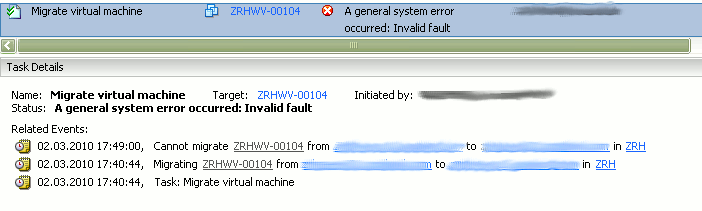
I knew I've seen such an error a long time ago, when I did my first VMware HA setups in 2004 but I quite couldn't remember the exact cause of it. This summarized task list helped me to remember it.
The simple cause is that the ESX hosts must resolve the DNS shortnames using the /etc/hosts file. So if you run into trouble, you have to add the server's short names into /etc/hosts like this:
127.0.0.1 localhost
::1 localhost
10.1.2.141 ESX01
10.1.2.142 esx02.localdomain.net esx02
10.1.2.143 esx03.localdomain.net esx03
10.1.2.144 esx04.localdomain.net esx04
10.1.2.145 esx05.localdomain.net esx05
10.1.2.146 esx06.localdomain.net esx06
10.1.2.147 esxi1.localdomain.net esxi1
10.1.2.148 esxi2.localdomain.net esxi2
10.1.2.149 esxi3.localdomain.net esxi3
After this, vmotion was working fine!
No comments yet.

AWS Android Ansible Apache Apple Atlassian BSD Backup Bash Bluecoat CMS Chef Cloud Coding Consul Containers CouchDB DB DNS Database Databases Docker ELK Elasticsearch Filebeat FreeBSD Galera Git GlusterFS Grafana Graphics HAProxy HTML Hacks Hardware Icinga Icingaweb Icingaweb2 Influx Internet Java KVM Kibana Kodi Kubernetes LVM LXC Linux Logstash Mac Macintosh Mail MariaDB Minio MongoDB Monitoring Multimedia MySQL NFS Nagios Network Nginx OSSEC OTRS Office PGSQL PHP Perl Personal PostgreSQL Postgres PowerDNS Proxmox Proxy Python Rancher Rant Redis Roundcube SSL Samba Seafile Security Shell SmartOS Solaris Surveillance Systemd TLS Tomcat Ubuntu Unix VMWare VMware Varnish Virtualization Windows Wireless Wordpress Wyse ZFS Zoneminder