
PHP Script: Generate RSS feed with MySQL entries
Last Update: 04.06.2008
RSS Feeds are meanwhile an important part of the so called Web 2.0. It is easy
to find (news-) updates of websites without visiting them manually. You can
check the RSS feeds via your browser or a third-party software.
For my portfolio site I was looking for a script, which can be combined with
MySQL. My blog entries are all in a table in a MySQL database.
I actually found a lot of possible scripts and howto's on the web but not many of them were useful or simply too complicated and too time intensive. I found the script I use for my website on this page: http://www.seopher.com/how-to-write-rss-generator.php. Although it is very good and exactly what I needed, it was a bit buggy and I had to make some changes that it finally worked. For example: The time and date of your RSS entries were not shown and the RSS feed was not closed (no </channel> </rss>).
- Note: While writing this HowTo, I also found a very good solution here too: http://tiffanybbrown.com/2005/12/22/dynamic-rss-feeds-using-php-mysql-and-apache/. -
In this article I describe it the way I use it and how it's well working for me. You might have to adapt it to your website and your tabledata.
Let's start with the database table, which I named news:
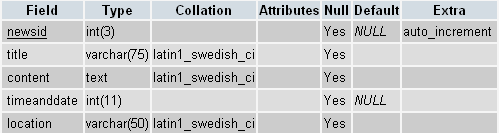
As you see, the field newsid is the unique identifier for each article.
It has an auto_increment entry, means it adds one number higher with every new
entry (1+1=2; 2+1=3 and so on). But we're not here to get to know that.
The title field contains the title of the article. Smart guess!
The field content ... Yes, you guessed it: It's the actual text you
write in your news/blog article. The field timeanddate contains both
time AND date. I set it to Integer(11) and it contains the timestamp of the
blog entry. I suggest you do the same, it is WAY easier to format it to all
different kind of date formats than if you would use "date" as field
type.
Last but not least there is the field location. In the case of my site
I just wanted to show the people where I wrote that entry. It's not relevant
for our RSS feed.
Next step: Create a new PHP file and call it whatever you want. I named it "rss.php". Copy the following code at the very begin of your empty PHP file. Adjust the variables to your site. Do not add "www" into variable $rss_site.
<?php
$rss_title= "ck - Blog on claudiokuenzler.com";
$rss_site= "claudiokuenzler.com" ;
$rss_description= "Online portfolio of Claudio Kuenzler";
$rss_language="en";
$rss_logo="http://www.claudiokuenzler.com/graph/content/rss.png";
$emailadmin="rss@claudiokuenzler.com";
header("Content-Type: text/xml;charset=iso-8859-1");
Now we have to connect to our MySQL database to read your news/blog entries. Enter your mysql_host, mysql_user, mysql_password and mysql_db. After that it selects all entries of the table news with a descending order of newsid (highest ID first).
mysql_connect ("mysql_host", "mysql_user", "mysql_password")
or die ('I cannot connect to the database because: ' . mysql_error());
mysql_select_db("mysql_db") or die("Unable to select DB");
$query = "select * from news ORDER BY newsid DESC" ;
$result = mysql_query($query) or die("Query failed") ;
Let's create the output to the browser. RSS feeds always start with a Channel-Description, basically "what this RSS feed is about". It is then followed by Items, each entry has its own <item>.
echo
'<?xml version="1.0" encoding="ISO-8859-1" ?>
<rss version="2.0">
<channel>
<title>'.$rss_title.'</title>
<link>http://www.'.$rss_site.'</link>
<description>'.$rss_description.'</description>
<language>en-en</language>
<image>
<url>'.$rss_logo.'</url>
<title>'.$rss_site.'</title>
<link>http://www.'.$rss_site.'</link>
</image>';
The following lines are basically here to read the information out of the database as we connected before. In this code I had to change the line with $pubdate to have a correct publishing date and time for each entry. The original code didn't work.
$subject = mysql_result($result,$i,'title');
$description = mysql_result($result,$i,'content');
// Clean the description
$description = str_replace ("&","",htmlspecialchars(strip_tags($description)));
//makes a 500 character long copy of the desciption - a teaser of your content
for people to read
$short_description = substr($description,0,500) . "...";
//to record when the feed was published
$timestamp = mysql_result($result,$i,'timeanddate');
//converts the timestamp into a RSS-friendly format
$pubdate = date ("D, d M Y H:i:s O", $timestamp);
The next code lines are finally the dynamical outputs of each item (each article in your RSS feed).
echo '
<item>
<title>'.$subject.'</title>
<link>http://www.'.$rss_site.'</link>
<guid isPermaLink="true">http://www.'.$rss_site.'</guid>
<description>'.$short_description.'</description>
<pubDate>'.$pubdate.'</pubDate>
</item>
';
And now all we have to do is to finish the RSS feed. On the original howto-page there is missing the closing of </channel> and </rss>.
mysql_close(); //close the DB
echo '
</channel>
</rss>
';
?>
With this solution you generate a RSS feed of your newest newws/blog entry in the database table. If you want the last 5 entries in the RSS feed, add following code BEFORE the output of the items.
for($i=0;$i<5; $i++) {
And AFTER the output of the item (before mysql_close()), close the bracket.
} //end of the for-loop

AWS Android Ansible Apache Apple Atlassian BSD Backup Bash Bluecoat CMS Chef Cloud Coding Consul Containers CouchDB DB DNS Database Databases Docker ELK Elasticsearch Filebeat FreeBSD Galera Git GlusterFS Grafana Graphics HAProxy HTML Hacks Hardware Icinga Icingaweb Icingaweb2 Influx Internet Java KVM Kibana Kodi Kubernetes LVM LXC Linux Logstash Mac Macintosh Mail MariaDB Minio MongoDB Monitoring Multimedia MySQL NFS Nagios Network Nginx OSSEC OTRS Office PGSQL PHP Perl Personal PostgreSQL Postgres PowerDNS Proxmox Proxy Python Rancher Rant Redis Roundcube SSL Samba Seafile Security Shell SmartOS Solaris Surveillance Systemd TLS Tomcat Ubuntu Unix VMWare VMware Varnish Virtualization Windows Wireless Wordpress Wyse ZFS Zoneminder