
If you use Knocknoc to secure your SSH server with MFA authentication, you might run into a similar problem as me, when iptables-restore didn't restore the persistent iptables rules after a reboot.
Knocknoc uses scripts (knockers) on an agent server. The Knocknoc agent runs on the target server - in my case the SSH server. There are several ways how to secure and integrate Knocknoc. One of the easiest ways is to use pre-defined ipset lists:
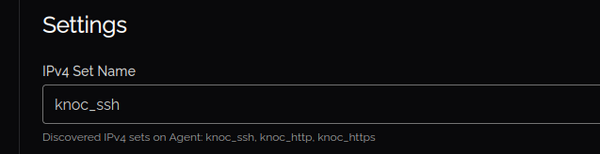
The listed ipsets are defined in /opt/knocknoc-agent/etc/ipset.list:
root@sshserver:~# cat /opt/knocknoc-agent/etc/ipset.list
knoc_ssh
knoc_http
knoc_https
These ipsets are created using the create-ipsets service:
root@sshserver:~# systemctl restart create-ipsets
root@sshserver:~# ipset -L | grep Name
Name: knoc_ssh
Name: knoc_ssh_v6
Name: knoc_http
Name: knoc_http_v6
Name: knoc_https
Name: knoc_https_v6
With the right local firewall rule, we can now tell the iptables (Kernel) firewall to allow SSH connections from IP addresses inside the knoc_ssh ipset list.
root@sshserver:~# iptables -A INPUT -i eth0 -p tcp --dport 22 -m set --match-set knoc_ssh src -j ACCEPT
root@sshserver:~# iptables -A INPUT -i eth0 -p tcp --dport 22 -m state --state NEW,ESTABLISHED,RELATED -j DROP
This works like a charm. Once a user successfully authenticates against the Knocknoc server, the relevant "Knoc" (connection to SSH server) is granted. Which means: In the background the Knocknoc agent on the SSH server received an information to add the user's IP address to the "knock_ssh" ipset list.
After a reboot I noticed that the firewall rules were not automatically loaded, even with the iptables-persistent package installed.
A closer look at the status of the iptables service showed why:
Dec 02 20:57:51 sshserver systemd[1]: Starting netfilter-persistent.service - netfilter persistent configuration...
Dec 02 20:57:51 sshserver netfilter-persistent[148]: run-parts: executing /usr/share/netfilter-persistent/plugins.d/15-ip4tables start
Dec 02 20:57:51 sshserver netfilter-persistent[151]: iptables-restore v1.8.9 (nf_tables): Set knoc_ssh doesn't exist.
Dec 02 20:57:51 sshserver netfilter-persistent[151]: Error occurred at line: 9
Dec 02 20:57:51 sshserver netfilter-persistent[151]: Try `iptables-restore -h' or 'iptables-restore --help' for more information.
Dec 02 20:57:51 sshserver netfilter-persistent[150]: Error: IPv4 rules failed test load. New rules NOT loaded
Dec 02 20:57:51 sshserver netfilter-persistent[148]: run-parts: executing /usr/share/netfilter-persistent/plugins.d/25-ip6tables start
Dec 02 20:57:51 sshserver systemd[1]: Finished netfilter-persistent.service - netfilter persistent configuration.
The iptables service was started before the "knoc_ssh" ipset was created (remember: By the create-ipsets service). And because this ipset was added in the persistent iptables rules (/etc/iptables/rules.v4), the iptables-restore command failed.
Now that we know that the iptables service should start AFTER the create-ipsets service, we can create a Systemd service dependency (After):
root@sshserver:~# mkdir -p /etc/systemd/system/iptables.service.d/
root@sshserver:~# vi /etc/systemd/system/iptables.service.d/knocknoc.conf
root@sshserver:~# cat /etc/systemd/system/iptables.service.d/knocknoc.conf
[Unit]
After=create-ipsets.service
Now the SSH server correctly restores the persistent iptables rules after a reboot, as create-ipsets service is started first and creates the mentioned ipsets.
No comments yet.

AI AWS Android Ansible Apache Apple Atlassian BSD Backup Bash Bluecoat CMS Chef Cloud Coding Consul Containers CouchDB DB DNS Databases Docker ELK Elasticsearch Filebeat FreeBSD Galera Git GlusterFS Grafana Graphics HAProxy HTML Hacks Hardware Icinga Influx Internet Java KVM Kibana Kodi Kubernetes LVM LXC Linux Logstash Mac Macintosh Mail MariaDB Minio MongoDB Monitoring Multimedia MySQL NFS Nagios Network Nginx OSSEC OTRS Observability Office OpenSearch PHP Perl Personal PostgreSQL PowerDNS Proxmox Proxy Python Rancher Rant Redis Roundcube SSL Samba Seafile Security Shell SmartOS Solaris Surveillance Systemd TLS Tomcat Ubuntu Unix VMware Varnish Virtualization Windows Wireless Wordpress Wyse ZFS Znuny Zoneminder