
In the past couple of days I ran into increasing issues connecting to multiple websites and services. The browsers (I tested both Chrome and Firefox) showed random "Unable to connect" errors.
At first I expected an issue with the DNS servers (I am using 1.1.1.1 and 8.8.8.8 as resolvers). I ran mtr against 1.1.1.1 and then saw something unexpected: The first hop (my own gateway/router) showed a pretty high packet loss between 18-25%. That's huge! That's the internal network, this should not happen!
The router, a Fritz!Box 4040 running OpenWRT, has been running for quite a while with the same version (shame on me, I know). Maybe it's a performance issue or a bug of that particular version?
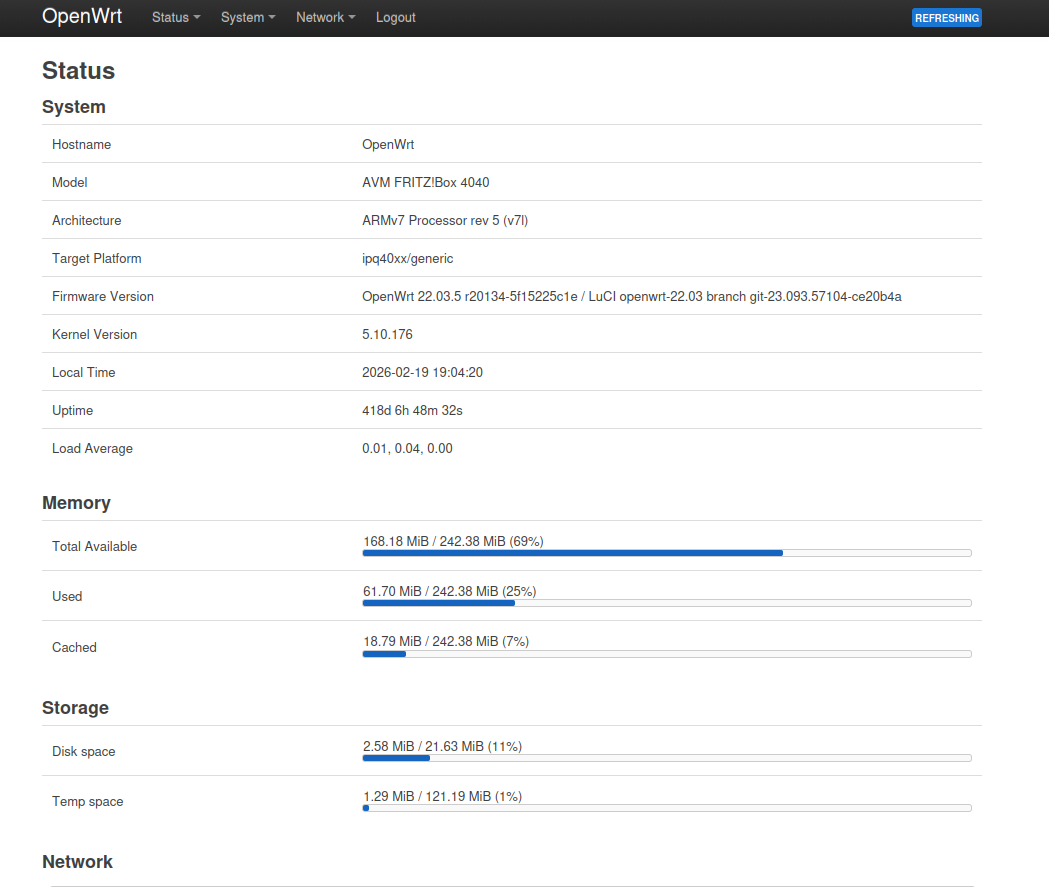
Let's update the OpenWRT firmware and find out. But research showed that flushing the firmware (even a firmware update) would reset the configuration. That's quite a pain, as I have a lot of rules and port forwarding configured. But luckily I came across the auc command. According to the documentation, the configurations survive the firmware update.
First, install auc on the CLI or in LUCI UI (System -> Software):
root@OpenWrt:~# opkg install auc
Installing auc (0.3.1-1) to root...
Downloading https://downloads.openwrt.org/releases/22.03.5/packages/arm_cortex-a7_neon-vfpv4/packages/auc_0.3.1-1_arm_cortex-a7_neon-vfpv4.ipk
Configuring auc.
Note: In newer OpenWRT releases, 24.x and later, the owut package replaces the auc package.
The auc command can now be told to check (-c) for newer firmware versions. It does that only within the currently used major release. From the screenshot above you can see this OpenWRT router is still on the 22.03 release.
root@OpenWrt:~# auc -c
auc/0.3.1-1
Server: https://sysupgrade.openwrt.org
Running: 22.03.5 r20134-5f15225c1e on ipq40xx/generic (avm,fritzbox-4040)
Available: 22.03.7 r20341-591b7e93d3
Requesting package lists...
kmod-crypto-gf128: 5.10.176-1 -> 5.10.221-1
kmod-usb-core: 5.10.176-1 -> 5.10.221-1
luci-app-opkg: git-23.093.42303-e16f620 -> git-24.302.38942-7a420e0
kmod-crypto-manager: 5.10.176-1 -> 5.10.221-1
kmod-crypto-ctr: 5.10.176-1 -> 5.10.221-1
luci-lib-ip: git-20.250.76529-62505bd -> git-23.311.79310-704a335
libwolfssl: 5.5.4-stable-1 -> 5.7.2-stable-1
[...]
It found a newer (available) firmware 22.03.7. Besides the newer firmware, auc also detected quite a lot of packages which can be upgraded. Pretty helpful!
The auc command comes with a nice parameter (-n) that allows to simulate the update process in a "dry-run" mode (rsync users, I know you just said A-HA!).
In the following example I tell auc to use the dry-run (-n), stay in the release/branch (-b) 22.03 and use the specified version (-B) 22.03.7 to update.
root@OpenWrt:~# auc -n -b 22.03 -B 22.03.7
auc/0.3.1-1
Server: https://sysupgrade.openwrt.org
Running: 22.03.5 r20134-5f15225c1e on ipq40xx/generic (avm,fritzbox-4040)
Available: 22.03.7 r20341-591b7e93d3
Requesting package lists...
kmod-crypto-gf128: 5.10.176-1 -> 5.10.221-1
kmod-usb-core: 5.10.176-1 -> 5.10.221-1
[...]
Are you sure you want to continue the upgrade process? [N/y] y
Requesting build.............................
Image available at https://sysupgrade.openwrt.org/store/6d2f78ad490ad0e2d9b4d6bcede6eeef1ff5b1e5bb957167d37c16efb042e476/openwrt-22.03.7-80d9ab46f705-ipq40xx-generic-avm_fritzbox-4040-squashfs-sysupgrade.bin
done
The dry-run did not show any errors. Let's go for the real update now. Same command as before, just without the -n parameter:
root@OpenWrt:~# auc -b 22.03 -B 22.03.7
auc/0.3.1-1
Server: https://sysupgrade.openwrt.org
Running: 22.03.5 r20134-5f15225c1e on ipq40xx/generic (avm,fritzbox-4040)
Available: 22.03.7 r20341-591b7e93d3
Requesting package lists...
kmod-crypto-gf128: 5.10.176-1 -> 5.10.221-1
kmod-usb-core: 5.10.176-1 -> 5.10.221-1
luci-app-opkg: git-23.093.42303-e16f620 -> git-24.302.38942-7a420e0
kmod-crypto-manager: 5.10.176-1 -> 5.10.221-1
kmod-crypto-ctr: 5.10.176-1 -> 5.10.221-1
luci-lib-ip: git-20.250.76529-62505bd -> git-23.311.79310-704a335
libwolfssl: 5.5.4-stable-1 -> 5.7.2-stable-1
[...]
Are you sure you want to continue the upgrade process? [N/y] y
Downloading image from https://sysupgrade.openwrt.org/store/6d2f78ad490ad0e2d9b4d6bcede6eeef1ff5b1e5bb957167d37c16efb042e476/openwrt-22.03.7-80d9ab46f705-ipq40xx-generic-avm_fritzbox-4040-squashfs-sysupgrade.bin
Writing to 'openwrt-22.03.7-80d9ab46f705-ipq40xx-generic-avm_fritzbox-4040-squashfs-sysupgrade.bin'
image verification succeeded
invoking sysupgrade
Connection to 192.168.178.1 closed by remote host.
Connection to 192.168.178.1 closed.
Uh-oh! I just got kicked out of my SSH session... *slight panic mode activated*
And I was not able to connect back in, as I got a connection refused immediately. I launched a ping to the gateway and ... test my patience:
$ ping 192.168.178.1
[...]
64 bytes from 192.168.178.1: icmp_seq=89 ttl=64 time=0.306 ms
64 bytes from 192.168.178.1: icmp_seq=90 ttl=64 time=0.269 ms
64 bytes from 192.168.178.1: icmp_seq=91 ttl=64 time=0.240 ms
64 bytes from 192.168.178.1: icmp_seq=92 ttl=64 time=1.76 ms
From 192.168.178.15 icmp_seq=196 Destination Host Unreachable
From 192.168.178.15 icmp_seq=197 Destination Host Unreachable
[...]
From 192.168.178.15 icmp_seq=279 Destination Host Unreachable
From 192.168.178.15 icmp_seq=280 Destination Host Unreachable
64 bytes from 192.168.178.1: icmp_seq=287 ttl=64 time=1025 ms
64 bytes from 192.168.178.1: icmp_seq=288 ttl=64 time=1.51 ms
64 bytes from 192.168.178.1: icmp_seq=289 ttl=64 time=0.249 ms
64 bytes from 192.168.178.1: icmp_seq=290 ttl=64 time=0.404 ms
64 bytes from 192.168.178.1: icmp_seq=291 ttl=64 time=0.194 ms
64 bytes from 192.168.178.1: icmp_seq=292 ttl=64 time=0.189 ms
As you can see from the ping replies, it took roughly 1.5min until the router rebooted. From there it took roughly 3 minutes until the router responded to pings again; on the configured IP address.
Panic averted, the router is back online. And a login on the LUCI UI confirmed the firmware update (minor update) was successful:
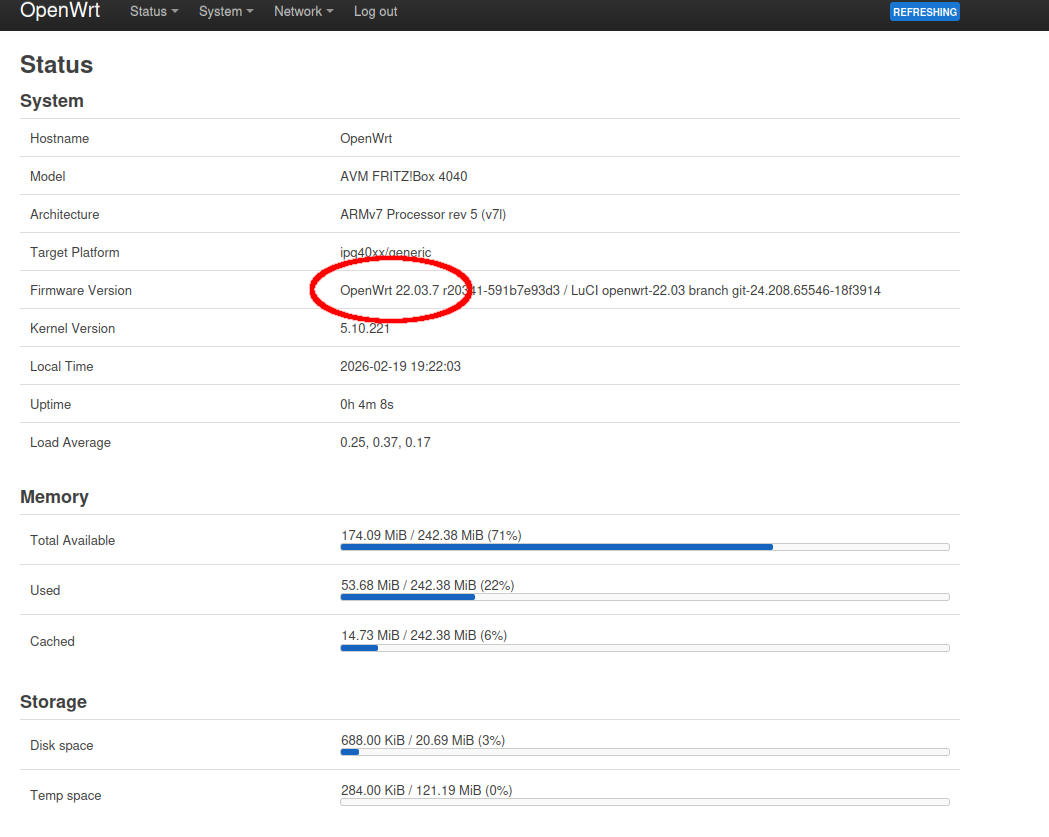
All configurations and manually installed packages were still in place.
Besides that, I could immediately "feel" a better responsiveness of the router, navigating in LUCI. I ran another mtr against the router and saw no more packet losses. Steady 0% even after 1000 packets sent. That's how it should be!
My monitoring also confirmed something else: The ping RTA from my monitoring server to the router dropped significantly since the firmware update and reboot, became much more steady:
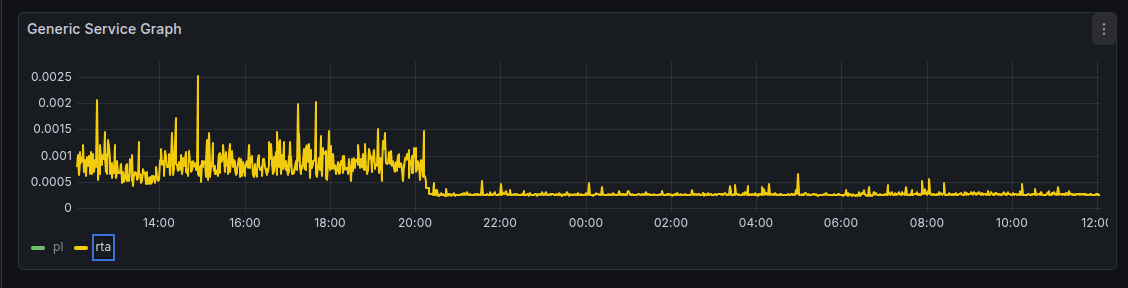
The morning after I did not run a single time into weird connectivity issues.
Either the firmware update fixed some weird performance bug or the reboot fixed the packet loss issue. My gut tells me, it was probably the reboot, but it was a good lesson anyway.
Next up would be a major update of the firmware, but I'm a bit hesitant as there seems to be a major change on this kind of device (ipq40xx) in 23.05.
Switched ipq40xx target to DSA
Need a proper fallback scenario before I attempt this.
No comments yet.

AI AWS Android Ansible Apache Apple Atlassian BSD Backup Bash Bluecoat CMS Chef Cloud Coding Consul Containers CouchDB DB DNS Databases Docker ELK Elasticsearch Filebeat FreeBSD Galera Git GlusterFS Grafana Graphics HAProxy HTML Hacks Hardware Icinga Influx Internet Java KVM Kibana Kodi Kubernetes LVM LXC Linux Logstash Mac Macintosh Mail MariaDB Minio MongoDB Monitoring Multimedia MySQL NFS Nagios Network Nginx OSSEC OTRS Observability Office OpenSearch PHP Perl Personal PostgreSQL PowerDNS Proxmox Proxy Python Rancher Rant Redis Roundcube SSL Samba Seafile Security Shell SmartOS Solaris Surveillance Systemd TLS Tomcat Ubuntu Unix VMware Varnish Virtualization Windows Wireless Wordpress Wyse ZFS Znuny Zoneminder