
For my wife's business I manage a website that uses WordPress in the background. The pages are made with Elementor, which is a powerful WYSIWYG online-editor to create pretty nice designs.
Over the years the site constantly grew, gotten some replacements, etc. A typical case of a "living" website, held up to date. Every update has worked fine so far, until yesterday.
I continued making changes on the front page and published them. However when I wanted to look at the changes in a different browser, the changes did not show.
It took me a while to realize it, but when I hit the "Publish" button (at the top right) in Elementor, at the bottom left an error was showing up for a couple of seconds:

Being primarily a server admin guy, I checked the server logs (web server access and error logs). And indeed, a POST request returned an internal server error:
xxx.xxx.xxx.xxx - - [05/Mar/2026:20:36:34 +0100] "POST /wp-admin/admin-ajax.php HTTP/1.0" 500 754 "https://www.example.com/wp-admin/post.php?post=5879&action=elementor" "Mozilla/5.0 (X11; Linux x86_64; rv:148.0) Gecko/20100101 Firefox/148.0"
That was indeed my request inside Elementor, trying to publish the changes.
The bigger problem though - and this is why I call this mysterious - was the fact, that nowhere else an error was logged. Typically when you get an internal server error, the web server's or PHP error log would reveal some fatal error in the code execution.
But neither the web server's error log, nor PHP log, and not even WordPress with DEBUG_LOG enabled logged anything useful, which would explain the internal server error.
After a (meanwhile becoming legacy/classic) research on the Internet, one specific WordPress support thread caught my eye. One of the developers responded to the OP:
> When there are too many revisions stored, the hosting memory may become exhausted, which can lead to this error.
Could this be an exhaustion of PHP's memory_limit? The domain and its own PHP-FPM pool are configured with a memory_limit of 256M. Is this not enough anymore?
Note: Usually exhaustion of PHP's memory_limit result in an error, clearly highlighting issues with the memory_limit being reached (tried to allocate...). But in this situation nothing was logged at all. Hence: Mysterious!
After checking out the revisions in Elementor, which I've never looked at before, I started to understand.
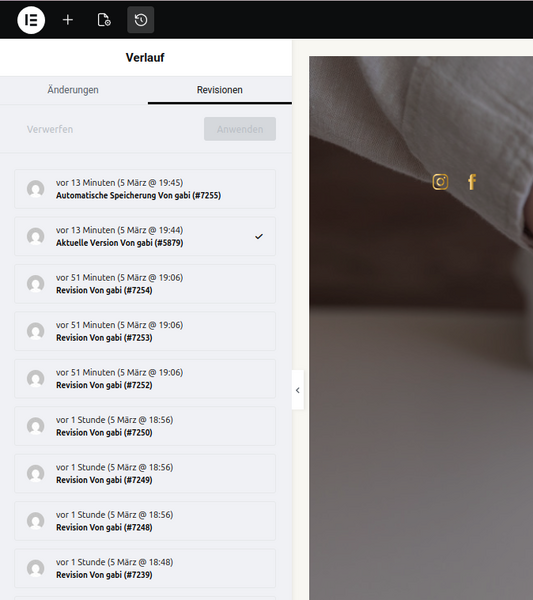
A ton of revisions were listed, dating back to the beginning of December 2025. If each revision is being held in memory for the possibility to revert a change... well then yes, I can actually believe that this could fully use the memory limit of the PHP process.
Although no PHP errors were logged that would point to memory exhaustion or reaching the memory_limit, it's so far the most plausible cause.
Let's try and increase from 256M to 512M.
root@webserver:~# grep memory_limit /etc/php/8.4/fpm/pool.d/www-data.conf
php_admin_value[memory_limit] = 512M
root@webserver:~# systemctl restart php8.4-fpm
Right after this, I tried again to do some changes in Elementor and clicked on publish. This time with success; the changes were successfully saved and published on the front page!
This means it was indeed a problem with the size of the front page, the number of changes/revisions of the page and the current PHP memory_limit.
I asked the WordPress experts from the Digital Web Agency WEBKINDER, whether they ever experienced a problem like this before. They've shared a nice code snippet with me, that limits the number of page revisions in WordPress:
add_filter('wp_revisions_to_keep', function (int $num, WP_Post $post) {
return post_type_supports($post->post_type, 'revisions') ? 30 : 0;
}, 10, 2);
This snippet can be placed into the theme's (or better: child theme) functions.php.
Luckily the WordPress website in question runs on a dedicated and WordPress optimized LAMP server. With a dedicated server the PHP's memory_limit could easily be increased to fit the needs. Using this kind of "heavy" WordPress setup requires much more memory than a standard site, hence it would (probably) never work on a shared hosting server - or it would but very slowly.
The golden rule is therefore: If you run a business website and you run Elementor on top of WordPress with many elements on your page, go for a dedicated server.
No comments yet.

AI AWS Android Ansible Apache Apple Atlassian BSD Backup Bash Bluecoat CMS Chef Cloud Coding Consul Containers CouchDB DB DNS Databases Docker ELK Elasticsearch Filebeat FreeBSD Galera Git GlusterFS Grafana Graphics HAProxy HTML Hacks Hardware Icinga Influx Internet Java KVM Kibana Kodi Kubernetes LVM LXC Linux Logstash Mac Macintosh Mail MariaDB Minio MongoDB Monitoring Multimedia MySQL NFS Nagios Network Nginx OSSEC OTRS Observability Office OpenSearch PHP Perl Personal PostgreSQL PowerDNS Proxmox Proxy Python Rancher Rant Redis Roundcube SSL Samba Seafile Security Shell SmartOS Solaris Surveillance Systemd TLS Tomcat Ubuntu Unix VMware Varnish Virtualization Windows Wireless Wordpress Wyse ZFS Znuny Zoneminder