
After the Operating System of a dedicated vServer for Znuny LTS (OTRS fork) was upgraded, Znuny ran into Internal Server Errors, also known as HTTP 500 errors.
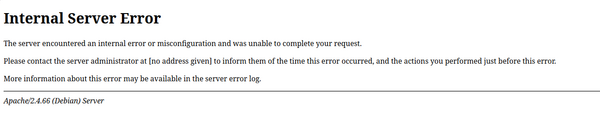
The error showed up after a "double" OS-upgrade from Debian 11 (Bullseye) via 12 (Bookworm) to 13 (Trixie). This also meant that Perl was upgraded from the initial 5.32 to 5.40. Znuny (and its predecessor OTRS CE) heavily rely on Perl as the whole application is written in Perl.
After hitting the Internal Server Error in the browser, the Apache2 error logs were checked. And indeed, some interesting log entries showed up:
root@znuny:/var/log/apache2# tail -f error.log
[...]
ERROR: OTRS-CGI-10 Perl: 5.40.1 OS: linux Time: Wed Apr 1 13:22:13 2026
Message: Can't locate Data/UUID.pm in @INC (you may need to install the Data::UUID module) (@INC entries checked: /usr/Custom /usr/Kernel/cpan-lib /usr /usr/sbin/../../Custom /usr/sbin/../../Kernel/cpan-lib /usr/sbin/../.. /opt/otrs/Custom /opt/otrs/Kernel/cpan-lib /opt/otrs/ /etc/perl /usr/local/lib/x86_64-linux-gnu/perl/5.40.1 /usr/local/share/perl/5.40.1 /usr/lib/x86_64-linux-gnu/perl5/5.40 /usr/share/perl5 /usr/lib/x86_64-linux-gnu/perl/5.40 /usr/share/perl/5.40 /usr/local/lib/site_perl /etc/apache2) at /opt/otrs/Kernel/System/DynamicField/Driver/WebserviceDropdown.pm line 13.
BEGIN failed--compilation aborted at /opt/otrs/Kernel/System/DynamicField/Driver/WebserviceDropdown.pm line 13.
Compilation failed in require at /opt/otrs/Kernel/System/Main.pm line 86.
RemoteAddress: 192.168.15.150
RequestURI: /otrs/index.pl?Action=AgentDashboard
Traceback (2738):
Module: Kernel::System::DynamicField::Backend::new Line: 85
Module: Kernel::System::ObjectManager::_ObjectBuild Line: 307
Module: Kernel::System::ObjectManager::Get Line: 201
Module: Kernel::Output::HTML::Dashboard::TicketGeneric::_SearchParamsGet Line: 2413
Module: Kernel::Output::HTML::Dashboard::TicketGeneric::Run Line: 591
Module: Kernel::Modules::AgentDashboardCommon::_Element Line: 1002
Module: Kernel::Modules::AgentDashboardCommon::Run Line: 629
Module: Kernel::System::Web::InterfaceAgent::Run Line: 1144
Module: ModPerl::ROOT::ModPerl::Registry::opt_otrs_bin_cgi_2dbin_index_2epl::handler Line: 39
Module: (eval) (v1.99) Line: 207
Module: ModPerl::RegistryCooker::run (v1.99) Line: 207
Module: ModPerl::RegistryCooker::default_handler (v1.99) Line: 173
Module: ModPerl::Registry::handler (v1.99) Line: 32
ERROR: OTRS-CGI-10 Perl: 5.40.1 OS: linux Time: Wed Apr 1 13:22:13 2026
Message: Can't load dynamic field backend module for field type WebserviceDropdown!
RemoteAddress: 192.168.15.150
RequestURI: /otrs/index.pl?Action=AgentDashboard
Traceback (2738):
Module: Kernel::System::DynamicField::Backend::new Line: 86
Module: Kernel::System::ObjectManager::_ObjectBuild Line: 307
Module: Kernel::System::ObjectManager::Get Line: 201
Module: Kernel::Output::HTML::Dashboard::TicketGeneric::_SearchParamsGet Line: 2413
Module: Kernel::Output::HTML::Dashboard::TicketGeneric::Run Line: 591
Module: Kernel::Modules::AgentDashboardCommon::_Element Line: 1002
Module: Kernel::Modules::AgentDashboardCommon::Run Line: 629
Module: Kernel::System::Web::InterfaceAgent::Run Line: 1144
Module: ModPerl::ROOT::ModPerl::Registry::opt_otrs_bin_cgi_2dbin_index_2epl::handler Line: 39
Module: (eval) (v1.99) Line: 207
Module: ModPerl::RegistryCooker::run (v1.99) Line: 207
Module: ModPerl::RegistryCooker::default_handler (v1.99) Line: 173
Module: ModPerl::Registry::handler (v1.99) Line: 32
[...]
For each request multiple ERROR entries were written to the Apache2 error log. However the relevant one, at least in this situation, was the first entry:
Message: Can't locate Data/UUID.pm in @INC (you may need to install the Data::UUID module)
Znuny needs more than the base Perl modules, that's common knowledge. But Znuny worked correctly before the OS upgrade. Did some Perl modules suddenly disappear?
Znuny has a specific script to check for the installed Perl modules, which can help us in this situation:
otrs@znuny:~$ /opt/otrs/bin/otrs.CheckModules.pl --all
o Apache::DBI......................ok (v1.12)
o Apache2::Reload..................ok (v0.13)
o Archive::Tar.....................ok (v3.02_001)
o Archive::Zip.....................ok (v1.68)
o Authen::SASL.....................ok (v2.1700)
o CPAN::Audit......................Not installed! To install, you can use: 'apt-get install -y libcpan-audit-perl'. (optional - Scan CPAN dependencies in Kernel/cpan-lib and in the system for known vulnerabilities.)
o Crypt::Eksblowfish::Bcrypt.......ok (v0.009)
o Crypt::JWT.......................Not installed! To install, you can use: 'apt-get install -y libcrypt-jwt-perl'. (optional - JSON web token support.)
o Crypt::OpenSSL::X509.............Not installed! To install, you can use: 'apt-get install -y libcrypt-openssl-x509-perl'. (optional - X509 certificate support.)
o CSS::Minifier::XS................ok (v0.13)
o Data::UUID.......................Not installed! To install, you can use: 'apt-get install -y libdata-uuid-perl'. (required - Required to generate UUIDs.)
o Date::Format.....................ok (v2.24)
o DateTime.........................ok (v1.65)
o DateTime::TimeZone.............ok (v2.65)
o DBI..............................ok (v1.647)
o DBD::mysql.......................ok (v4.053)
o DBD::ODBC........................Not installed! To install, you can use: 'apt-get install -y libdbd-odbc-perl'. (optional - Required to connect to a MS-SQL database.)
o DBD::Oracle......................Not installed! (optional - Required to connect to a Oracle database.)
o DBD::Pg..........................Not installed! To install, you can use: 'apt-get install -y libdbd-pg-perl'. (optional - Required to connect to a PostgreSQL database.)
o Digest::SHA......................ok (v6.04)
o Encode::HanExtra.................ok (v0.23)
o Excel::Writer::XLSX..............ok (v0.95)
o Hash::Merge......................ok (v0.302)
[...]
Even though there are a couple of modules currently not installed, the relevant ones to look at are the modules that are tagged "required". And from the whole list shown, the only currently not installed but required module is Data::UUID.
So let's get this module back:
root@znuny:~# apt-get install libdata-uuid-perl
After the installation the CheckModules script now showed all required packages installed.
Let's "restart" Znuny, which is done by an Apache2 restart:
root@znuny:~# systemctl restart apache2
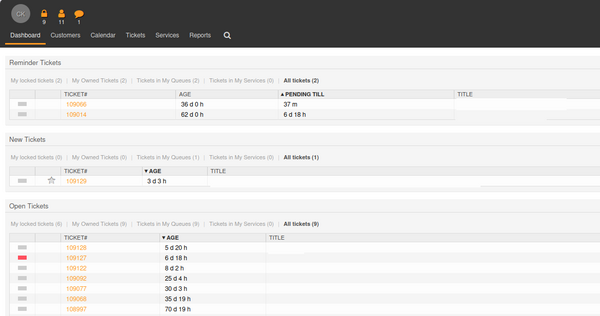
And the error is gone. Znuny is working again!
If all of the steps above sound too complicated, you don't have to do this yourself. With Infiniroot's Hosted Znuny, you get a dedicated virtual server with dedicated resources for full performance and security. We take care of OS and Znuny upgrades, while you can simply enjoy the application without the system dependencies behind it.
No comments yet.

AI AWS Android Ansible Apache Apple Atlassian BSD Backup Bash Bluecoat CMS Chef Cloud Coding Consul Containers CouchDB DB DNS Databases Docker ELK Elasticsearch Filebeat FreeBSD Galera Git GlusterFS Grafana Graphics HAProxy HTML Hacks Hardware Icinga Influx Internet Java KVM Kibana Kodi Kubernetes LVM LXC Linux Logstash Mac Macintosh Mail MariaDB Minio MongoDB Monitoring Multimedia MySQL NFS Nagios Network Nginx OSSEC OTRS Observability Office OpenSearch PHP Perl Personal PostgreSQL PowerDNS Proxmox Proxy Python Rancher Rant Redis Roundcube SSL Samba Seafile Security Shell SmartOS Solaris Surveillance Systemd TLS Tomcat Ubuntu Unix VMware Varnish Virtualization Windows Wireless Wordpress Wyse ZFS Znuny Zoneminder