
I've been using Claude Code for a while now. In the background I am using Claude-Code-Router (ccr) and integrated the Venice API as AI Provider.
This setup has been running fine for many months, but when I decided to update NodeJS on my Linux Mint workstation, I ran into troubles.
TL;DR: If you change the NodeJS version on your workstation, re-install Claude Code Router with allow-scripts enabled for the required better-sqlite3 dependency. You might have to update your local profiles afterwards.
The issue with NodeJS (and npm) installed through the official package repos is the more or less outdated version. Even though I am running the latest Linux Mint 22.3, this uses the Ubuntu LTS 24.04 repositories for software packages.
It's nothing new that the LTS releases keep the same software version, to ensure a stable system. For 90% of software you need, this is absolutely fine. But NodeJS moves quickly and this can cause issues - especially if you need to install software using npm.
A couple of years ago I already described how to install a newer NodeJS and npm version on Debian and Ubuntu distributions, and this is what I used in this situation again.
First I removed the packaged version of NodeJS, which is nodejs:20.20.2:
ck@mint:~# sudo apt-get remove nodejs
And then I installed the latest NodeJS LTS, which is currently 24.x.
ck@mint ~ $ node -v
v24.20.0
Great. This should help be ready for updated npm packages et al.
That's what I thought.
The next time I wanted to use ccr (a day later), I ran into an error.
ck@mint ~ $ ccr code
ccr code [config] Failed to load config: Could not locate the bindings file. Tried:
-> /usr/local/lib/node_modules/@musistudio/claude-code-router/node_modules/better-sqlite3/build/better_sqlite3.node
-> /usr/local/lib/node_modules/@musistudio/claude-code-router/node_modules/better-sqlite3/build/Debug/better_sqlite3.node
[...]
The error message is truncated here as it was quite long, but always mentioning better_sqlite3.
After asking AI (ChatGPT in this case), the recommendation was to downgrade to NodeJS 22.x.
However: I'd strongly consider Node 22
There have historically been compatibility problems between better-sqlite3 and new Node releases; there was specifically an issue reported for Node 24 where downgrading to Node 22 resolved the problem.
Whether or not this is true I am not sure, but let's give it a shot anyway. NodeJS 22.x is also a LTS release and still maintained.
Alright, so meanwhile my machine has NodeJS 22.x:
ck@mint ~ $ node -v
v22.23.2
But ccr would still show an error. Let's try to reinstall Claude Code Router (now for Node 22):
ck@mint ~ $ sudo npm install -g @musistudio/claude-code-router
npm warn deprecated prebuild-install@7.1.3: No longer maintained. Please contact the author of the relevant native addon; alternatives are available.
changed 102 packages in 2s
31 packages are looking for funding
run `npm fund` for details
npm warn install-scripts 1 package had install scripts blocked because they are not covered by allowScripts:
npm warn install-scripts better-sqlite3@12.11.1 (install: prebuild-install || node-gyp rebuild --release)
npm warn install-scripts
npm warn install-scripts Run `npm install -g --allow-scripts=better-sqlite3` to allow these scripts once, or `npm config set allow-scripts=better-sqlite3 --location=user` to allow them for all global installs.
But ccr code would still fail:
ck@mint ~ $ ccr code
[config] Failed to load config: Could not locate the bindings file. Tried:
-> /usr/local/lib/node_modules/@musistudio/claude-code-router/node_modules/better-sqlite3/build/better_sqlite3.node
-> /usr/local/lib/node_modules/@musistudio/claude-code-router/node_modules/better-sqlite3/build/Debug/better_sqlite3.node
At this point we're not better off with Node 22 compared to Node 24. Thanks for the advice, AI. :-/
The next recommendation was to rebuild the complaining module, better-sqlite3, directly inside CCR, but this also didn't work.
After a couple more attempts and prompting, I finally was on the right track.
One of the warnings above, right when (re-) installing the npm module claude-code-router, was about running scripts. Eventually the AI picked this up, too and said:
we found the problem. npm 12's allow-scripts security mechanism is blocking better-sqlite3's install script.
Let's do a fresh install, once again. Fully remove the claude-code-router and then install it again - but this time allowing scripts to be run for the better-sqlite3 depedency:
ck@mint ~ $ sudo npm uninstall -g @musistudio/claude-code-router
up to date in 196ms
ck@mint ~ $ sudo npm install -g --allow-scripts=better-sqlite3 @musistudio/claude-code-router
npm warn deprecated prebuild-install@7.1.3: No longer maintained. Please contact the author of the relevant native addon; alternatives are available.
added 102 packages in 2s
31 packages are looking for funding
run `npm fund` for details
Well, at least this time the warnings about the scripts don't show up anymore...
What about my ccr command?
ck@mint ~ $ ccr code
Profile "code" was not found or is disabled.
No error this time, but it seems the previous default profile "code" is not here anymore.
Now that ccr itself runs again, I needed to re-create the default profile. Prior to my update frenzy, I could launch ccr code. That means there was a profile "code".
Using ccr ui gives an easy to understand configuration UI of the Claude Code Router. This showed the default profile being named "Claude Code". So I could use ccr Claude Code from now on, but I renamed the default profile again to "code" and at the same time changed the default LLM to Opus 4.8 (and if you're asking, no, for my needs I really don't need a powerful Fable).
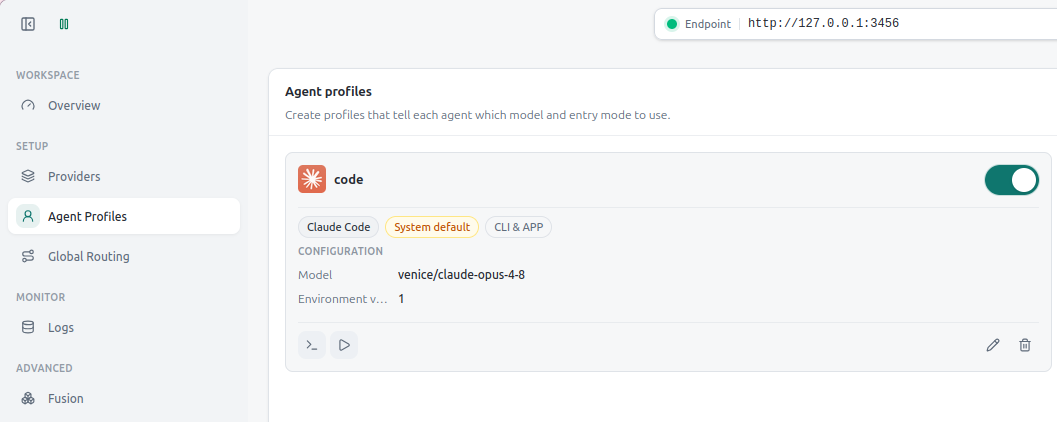
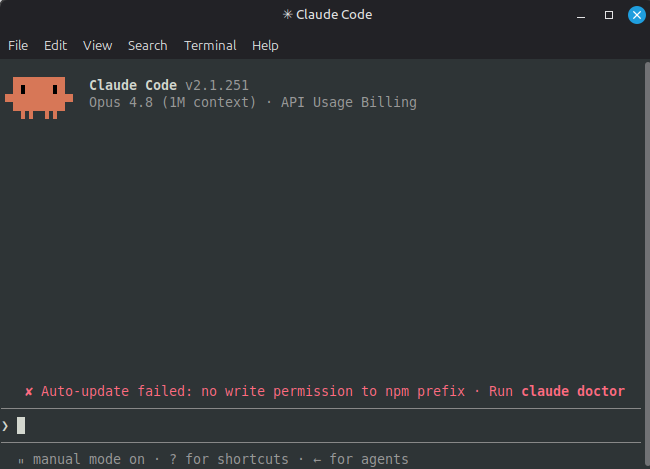
And now, with the default profile "code" back in place, ccr code works again.
No comments yet.

AI AWS Android Ansible Apache Apple Atlassian BSD Backup Bash Bluecoat CMS Chef Cloud Coding Consul Containers CouchDB DB DNS Databases Docker ELK Elasticsearch Filebeat FreeBSD Galera Git GlusterFS Grafana Graphics HAProxy HTML Hacks Hardware Icinga Influx Internet Java KVM Kibana Kodi Kubernetes LVM LXC Linux Logstash Mac Macintosh Mail MariaDB Minio MongoDB Monitoring Multimedia MySQL NFS Nagios Network Nginx OSSEC OTRS Observability Office OpenSearch PHP Perl Personal PostgreSQL PowerDNS Proxmox Proxy Python Rancher Rant Redis Roundcube SSL Samba Seafile Security Shell SmartOS Solaris Surveillance Systemd TLS Tomcat Ubuntu Unix VMware Varnish Virtualization Windows Wireless Wordpress Wyse ZFS Znuny Zoneminder