
In the past days Icinga released a couple of new feature releases and security fixes that spans across multiple products:
Basically the whole stack around an Icinga monitoring gets an update.
So many updates... will this have an impact?
Shortly after the Icinga DB packages were upgraded, the Icinga Web UI prompty showed a red bar at the bottom. The message is undeniably clear: There's a problem with the Icinga DB now.

It seems that Icinga DB is not running. Make sure Icinga DB is running and writing into the database.
During the package upgrade I already noticed that the existing config wanted to be overridden:
Configuration file '/etc/icingadb/config.yml'
==> Modified (by you or by a script) since installation.
==> Package distributor has shipped an updated version.
What would you like to do about it ? Your options are:
Y or I : install the package maintainer's version
N or O : keep your currently-installed version
D : show the differences between the versions
Z : start a shell to examine the situation
The default action is to keep your current version.
*** config.yml (Y/I/N/O/D/Z) [default=N] ? N
The differential comparison showed that the config.yml file has increased in size, but also removes the existing options, such as database user and password. So I decided to keep my config.yml (N).
But the configuration file isn't the reason Icinga DB would not start. A status of the service reveals more:
root@icinga2:~ # systemctl status icingadb
x icingadb.service - Icinga DB
Loaded: loaded (/usr/lib/systemd/system/icingadb.service; enabled; preset: enabled)
Active: failed (Result: exit-code) since Wed 2026-11-04 10:05:38 CET; 20s ago
Duration: 2ms
Invocation: f2a8cd92fbab4eb38bce42c83e7a9635
Process: 336129 ExecStart=/usr/sbin/icingadb --config /etc/icingadb/config.yml (code=exited, status=1/FAILURE)
Main PID: 336129 (code=exited, status=1/FAILURE)
Mem peak: 6.2M
CPU: 10ms
Nov 04 10:05:38 icinga2 systemd[1]: Starting icingadb.service - Icinga DB...
Nov 04 10:05:38 icinga2 icingadb[336129]: Starting Icinga DB daemon (v1.6.0)
Nov 04 10:05:38 icinga2 icingadb[336129]: Connecting to database at 'mysql://icinga@localhost:3306/icingadb'
Nov 04 10:05:38 icinga2 systemd[1]: Started icingadb.service - Icinga DB.
Nov 04 10:05:38 icinga2 icingadb[336129]: unexpected database schema version: v7 (expected v8), please make sure you have applied all database migrations after upgrading Icinga DB
Nov 04 10:05:38 icinga2 systemd[1]: icingadb.service: Main process exited, code=exited, status=1/FAILURE
Nov 04 10:05:38 icinga2 systemd[1]: icingadb.service: Failed with result 'exit-code'.
The Icinga DB error clearly states, that a database schema upgrade is required.
To upgrade to Icinga DB 1.6, an updated database schema is required. This is described in the Icinga DB 1.6 release notes on GitHub.
The 1.6.0.sql schema upgrade is available and must be applied.
The schema update should come along with the updated package and can be found in the path /usr/share/icingadb/schema/mysql/upgrades/:
root@icinga2:~# ls -la /usr/share/icingadb/schema/mysql/upgrades/
total 80
drwxr-xr-x 3 root root 4096 Nov 4 10:05 .
drwxr-xr-x 3 root root 4096 Nov 4 10:05 ..
-rw-r--r-- 1 root root 28471 Oct 29 14:24 1.0.0-rc2.sql
-rw-r--r-- 1 root root 12095 Oct 29 14:24 1.0.0.sql
-rw-r--r-- 1 root root 2534 Oct 29 14:24 1.1.1.sql
-rw-r--r-- 1 root root 788 Oct 29 14:24 1.2.0.sql
-rw-r--r-- 1 root root 1497 Oct 29 14:24 1.2.1.sql
-rw-r--r-- 1 root root 4483 Oct 29 14:24 1.4.0.sql
-rw-r--r-- 1 root root 4915 Oct 29 14:24 1.6.0.sql
drwxr-xr-x 2 root root 4096 Nov 4 10:05 optional
By using the mysql command and using the database credentials found in the Icinga DB config file (/etc/icingadb/config.yml), the 1.6.0.sql file can be imported right into the database.
root@icinga2:~# mysql -u icinga -p icingadb < /usr/share/icingadb/schema/mysql/upgrades/1.6.0.sql
Enter password: xxxxxxxxxxxxxxxxxxxxxxxx
If you use PostgreSQL you obviously need to apply the Postgres schema update using PostgreSQL commands (psql for example).
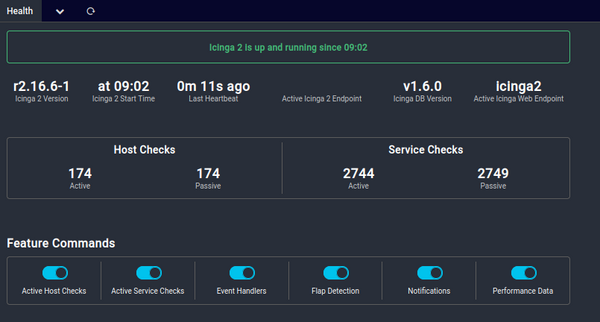
Right after the successful import of the SQL file and therefore the database schema upgrade, Icinga DB can be started again and the error in Icinga Web disappeared.
root@icinga2:~# systemctl start icingadb
root@icinga2:~# journalctl -fu icingadb
Nov 04 10:08:23 icinga2 icingadb[338537]: Starting overdue sync
Nov 04 10:08:23 icinga2 icingadb[338537]: Starting initial state sync
Nov 04 10:08:23 icinga2 icingadb[338537]: config-sync: Updating 174 items of type host state
Nov 04 10:08:23 icinga2 icingadb[338537]: config-sync: Updating 19 items of type dependency edge state
Nov 04 10:08:23 icinga2 icingadb[338537]: Starting config runtime updates sync
Nov 04 10:08:23 icinga2 icingadb[338537]: config-sync: Finished config sync in 138.107112ms
Nov 04 10:08:23 icinga2 icingadb[338537]: config-sync: Updating 2540 items of type service state
Nov 04 10:08:23 icinga2 icingadb[338537]: Starting history retention
Nov 04 10:08:23 icinga2 icingadb[338537]: config-sync: Finished initial state sync in 219.072562ms
[...]
No comments yet.

AI AWS Android Ansible Apache Apple Atlassian BSD Backup Bash Bluecoat CMS Chef Cloud Coding Consul Containers CouchDB DB DNS Databases Docker ELK Elasticsearch Filebeat FreeBSD Galera Git GlusterFS Grafana Graphics HAProxy HTML Hacks Hardware Icinga Influx Internet Java KVM Kibana Kodi Kubernetes LVM LXC Linux Logstash Mac Macintosh Mail MariaDB Minio MongoDB Monitoring Multimedia MySQL NFS Nagios Network Nginx OSSEC OTRS Observability Office OpenSearch PHP Perl Personal PostgreSQL PowerDNS Proxmox Proxy Python Rancher Rant Redis Roundcube SSL Samba Seafile Security Shell SmartOS Solaris Surveillance Systemd TLS Tomcat Ubuntu Unix VMware Varnish Virtualization Windows Wireless Wordpress Wyse ZFS Znuny Zoneminder