
As I am a die hard command line user I use vim to edit 90% of code, so I added Claude Code into the terminal (TUI).
Claude Code itself is a npm package which connects to a local Claude Code Router (ccr), which is another npm package. The ccr connects to an AI provider in the background, where the LLM is accessed (and where the money goes). In my situation I am using Venice AI as AI provider.
This setup has worked quite fine for me, although I haven't used it too often. For the recent changes on the check_smart monitoring plugin I have worked "together" with Claude Code.
Get 10$ worth of token credits on Venice AI, when you sign up using this link.
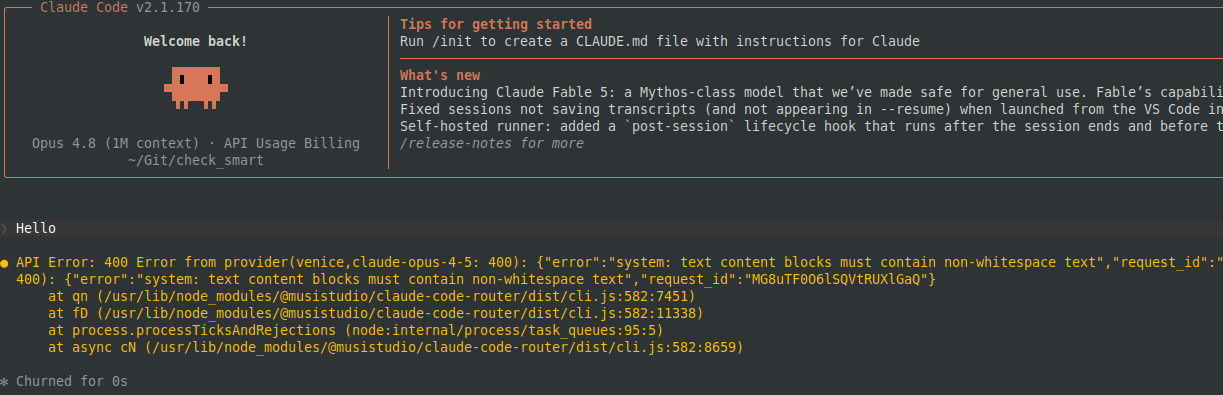
But all of a sudden, ccr code stopped working. Whatever prompt I entered, I always got the same error:
ck@mint ~/Git/check_smart $ ccr code
> Hello
API Error: 400 Error from provider(venice,claude-opus-4-5: 400): {"error":"system: text content blocks must contain non-whitespace text","request_id":"MG8uTF0O6lSQVtRUXlGaQ"}Error: Error from provider(venice,claude-opus-4-5:
400): {"error":"system: text content blocks must contain non-whitespace text","request_id":"MG8uTF0O6lSQVtRUXlGaQ"}
at qn (/usr/lib/node_modules/@musistudio/claude-code-router/dist/cli.js:582:7451)
at fD (/usr/lib/node_modules/@musistudio/claude-code-router/dist/cli.js:582:11338)
at process.processTicksAndRejections (node:internal/process/task_queues:95:5)
at async cN (/usr/lib/node_modules/@musistudio/claude-code-router/dist/cli.js:582:8659)
How do you ask AI how to fix this when AI is broken? ;-)
ChatGPT focused on the ccr (Claude Code Router) configuration file and thought there could be a problem - but there wasn't. It also suggested to temporarily remove my local ~/.claude directory and try with an empty/new profile. None of the suggestions worked.
A legacy research on Google pointed me to similar error messages on GitHub, but the issues were either still open or closed without resolution.
The logs in ~/.claude-code-router/logs did not show anything useful (if at all anything) either.
As ccr code stopped working from one day to another (without having touched the npm packages), maybe I was running an outdated npm package and the AI provider expects the data (prompt) in a newer/different format?
So let's make sure, we get the latest packages.
ck@mint ~ $ sudo npm install -g @musistudio/claude-code-router
ck@mint ~ $ sudo npm install -g @anthropic-ai/claude-code
With this, the packages should be the latest release.
ck@mint ~ $ npm list -g
/usr/lib
|-- @anthropic-ai/claude-code@2.1.170
|-- @musistudio/claude-code-router@2.0.0
|-- corepack@0.34.6
|-- npm@10.8.2
Now restarting ccr, just to make sure the new version is used:
ck@mint ~ $ ccr stop
claude code router service has been successfully stopped.
ck@mint ~ $ ccr start &
[1] 322902
ck@mint ~ $ ccr status
Claude Code Router Status
===================================
Status: Running
Process ID: 322902
Port: 3456
API Endpoint: http://127.0.0.1:3456
PID File: /home/ck/.claude-code-router/.claude-code-router.pid
Ready to use! Run the following commands:
ccr code # Start coding with Claude
ccr stop # Stop the service
But right after this, the same error 400 showed up - again!
At this point I thought I will start over. I should remove all packages and ~/.claude* directories and start from scratch. For this I opened the Claude Code for Linux Guide from Venice AI.
While reading through the whole document, I stumbled on something I haven't really noticed before: The Caching section.
A small drop down menu "When to use cleancache" showed something interesting:
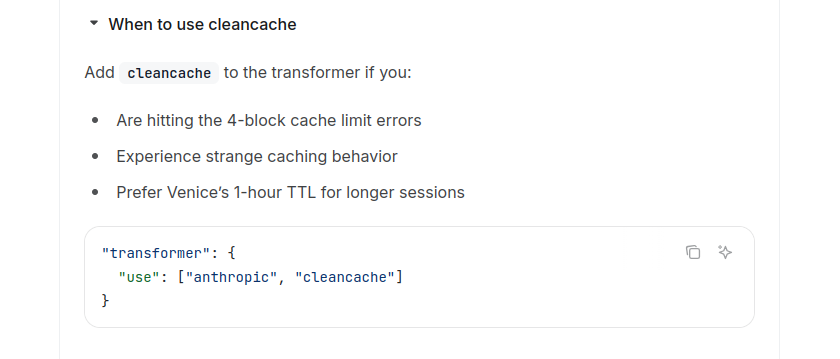
Well, the error message itself does not mention a caching issue at all - but I'm experiencing a "strange behaviour". Let's give it a shot, shall we?
As mentioned in the guide, I added the "cleancache" option into the AI provider's transformer option:
ck@mint ~ $ vi ~/.claude-code-router/config.json
ck@mint ~ $ grep transformer -A 1 ~/.claude-code-router/config.json
"transformer": {
"use": ["anthropic", "cleancache"]
And then restarted Claude Code Router using ccr stop and ccr start.
Now a new attempt in my check_smart Git repo:
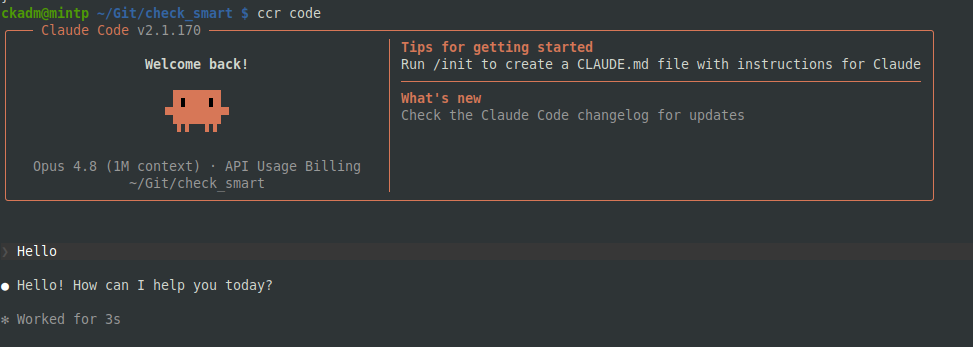
And this time it worked!!! The prompt responded and no API Error 400 showed up anymore!
Vytenis from Vilnius wrote on Jun 15th, 2026:
There are quite a few people in my circle who use various AI routers. I’ve noticed that they experiment with different LLMs, but then use Claude Code. It’s really taking off right now, and the situation could change, so the router makes sense.
I started a container called node:22-bookworm-slim, installed claude-code (npm install -g @anthropic-ai/claude-code), and then use claude in the terminal. Basically, I chose this approach because it’s more convenient for me to work with files this way.
That’s why I’m curious why others choose the router. Sorry if I’m being too nosy. :)
ck from Switzerland wrote on Jun 15th, 2026:
Hi Vytenis! You mean why not use Claude Code integrated in an IDE? Because I like to work on my files with the console and vim as editor. When I looked for a way to integrate Claude Code in the terminal, I came across ccr. Maybe there are other ways, too. For Venice: I decided to try with this AI provider since I installed OpenClaw and had to choose an AI provider. The description in OpenClaws documentation showed Venice has a high privacy setting. Whether or not this is true I actually do not know. But since then I stuck with it.
Vytenis from Vilnius wrote on Jun 14th, 2026:
Why use CCR? Why not just use Claude Code directly? That brings me to another question: why choose Venice AI?

AI AWS Android Ansible Apache Apple Atlassian BSD Backup Bash Bluecoat CMS Chef Cloud Coding Consul Containers CouchDB DB DNS Databases Docker ELK Elasticsearch Filebeat FreeBSD Galera Git GlusterFS Grafana Graphics HAProxy HTML Hacks Hardware Icinga Influx Internet Java KVM Kibana Kodi Kubernetes LVM LXC Linux Logstash Mac Macintosh Mail MariaDB Minio MongoDB Monitoring Multimedia MySQL NFS Nagios Network Nginx OSSEC OTRS Observability Office OpenSearch PHP Perl Personal PostgreSQL PowerDNS Proxmox Proxy Python Rancher Rant Redis Roundcube SSL Samba Seafile Security Shell SmartOS Solaris Surveillance Systemd TLS Tomcat Ubuntu Unix VMware Varnish Virtualization Windows Wireless Wordpress Wyse ZFS Znuny Zoneminder