
A while ago I posted about the monitoring of AWS MemoryDB, which uses Valkey (by default) in the background.
Back then the valkey-status monitoring plugin from Linux Fabrik was enhanced to cover AWS' MemoryDB, which required to use TLS connection and user/password authentication.
The changes were merged and the monitoring lived on happily. Until a couple of days ago.

After the monitoring server's installed packages were updated, the monitoring checks on the AWS MemoryDB / Valkey services started to fail with the following error:
`valkey-cli info default` failed (exit 1): Could not negotiate a TLS connection: Invalid CA Certificate File/Directory
Could not negotiate a TLS connection: Invalid CA Certificate File/Directory
A closer look at the APT history logs revealed that the monitoring plugins from Linux Fabrik were updated: linuxfabrik-monitoring-plugins:amd64 (2.2.1-1, 8.1.0-2+ubuntu24.04).
This means: Some changes happened to the valkey-status plugin that broke the AWS MemoryDB check.
A closer look at the code revealed that the --cacert parameter is enforced whenever --tls is used. --tls is required to check MemoryDB services in AWS, however --cacert is not needed.
if args.TLS:
base_cmd += ['--tls', '--cacert', args.CACERT]
As --cacert points to a hardcoded default path (DEFAULT_CACERT = '/etc/pki/tls/certs/rootCA.pem') and this file does not exist on our monitoring server, the check fails with the error message shown above. But more importantly - as already mentioned - the --cacert option is not needed. It should be optional, for those who use self-signed certificates on the Valkey service.
The plugin was fixed by:
The pull request contains all the changes.
Now with these changes in place, MemoryDB/Valkey monitoring checks in AWS work again:
ck@monitoring:~$ /usr/lib64/nagios/plugins/valkey-status -H clustercfg.mymemorydb.igucof.memorydb.eu-central-1.amazonaws.com --tls --username admin --password "secret" --ignore-overcommit --ignore-maxmemory0 --ignore-thp
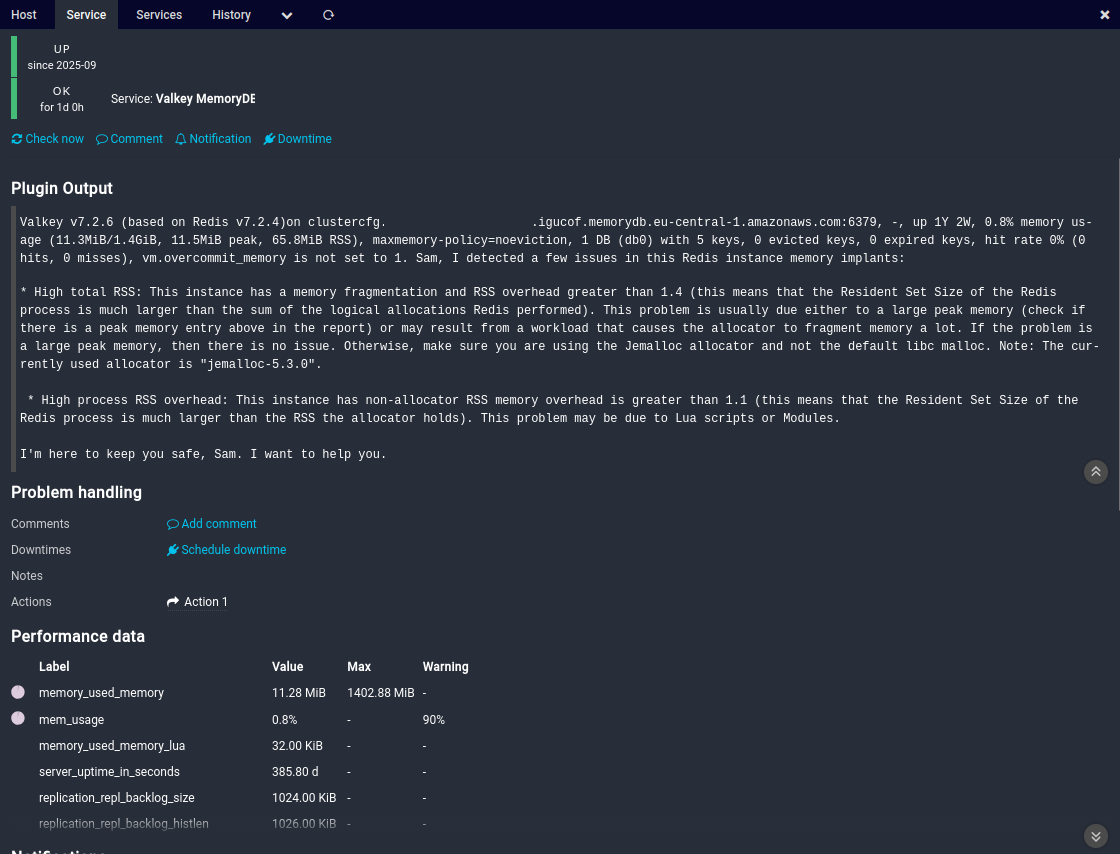
Valkey v7.2.6 (based on Redis v7.2.4)on clustercfg.onlnzz-test-003-mdb1.igucof.memorydb.eu-central-1.amazonaws.com:6379, -, up 1Y 2W, 0.8% memory usage (11.3MiB/1.4GiB, 11.5MiB peak, 65.6MiB RSS), maxmemory-policy=noeviction, 1 DB (db0) with 5 keys, 0 evicted keys, 0 expired keys, hit rate 0% (0 hits, 0 misses), vm.overcommit_memory is not set to 1. Sam, I detected a few issues in this Redis instance memory implants:
* High total RSS: This instance has a memory fragmentation and RSS overhead greater than 1.4 (this means that the Resident Set Size of the Redis process is much larger than the sum of the logical allocations Redis performed). This problem is usually due either to a large peak memory (check if there is a peak memory entry above in the report) or may result from a workload that causes the allocator to fragment memory a lot. If the problem is a large peak memory, then there is no issue. Otherwise, make sure you are using the Jemalloc allocator and not the default libc malloc. Note: The currently used allocator is "jemalloc-5.3.0".
* High process RSS overhead: This instance has non-allocator RSS memory overhead is greater than 1.1 (this means that the Resident Set Size of the Redis process is much larger than the RSS the allocator holds). This problem may be due to Lua scripts or Modules.
I'm here to keep you safe, Sam. I want to help you.|'keyspace_db0_keys'=5;;;0 'keyspace_db0_expires'=0;;;0 'keyspace_db0_avg_ttl'=0.0s;;;0 'db_count'=1;;;0 'key_count'=5;;;0 'mem_usage'=0.8%;90;;0;100 'keyspace_hit_rate'=0%;;;0;100 'clients_blocked_clients'=0.0;;;0 'clients_connected_clients'=7.0;;;0 'memory_maxmemory'=1471026299.0B;;;0 'memory_mem_fragmentation_ratio'=5.83;;;0 'memory_used_memory'=11832936.0B;;;0;1471026299 'memory_used_memory_lua'=32768.0B;;;0 'memory_used_memory_rss'=68796416.0B;;;0 'persistence_aof_current_rewrite_time_sec'=0s;;;0 'persistence_rdb_changes_since_last_save'=11.0;;;0 'persistence_rdb_current_bgsave_time_sec'=0s;;;0 'replication_connected_slaves'=0.0;;;0 'replication_repl_backlog_histlen'=1058473.0B;;;0 'replication_repl_backlog_size'=1048576.0B;;;0 'server_uptime_in_seconds'=33333123.0s;;;0 'stats_latest_fork_usec'=0.0us;;;0
And the service view in Icinga 2:
No comments yet.

AI AWS Android Ansible Apache Apple Atlassian BSD Backup Bash Bluecoat CMS Chef Cloud Coding Consul Containers CouchDB DB DNS Databases Docker ELK Elasticsearch Filebeat FreeBSD Galera Git GlusterFS Grafana Graphics HAProxy HTML Hacks Hardware Icinga Influx Internet Java KVM Kibana Kodi Kubernetes LVM LXC Linux Logstash Mac Macintosh Mail MariaDB Minio MongoDB Monitoring Multimedia MySQL NFS Nagios Network Nginx OSSEC OTRS Observability Office OpenSearch PHP Perl Personal PostgreSQL PowerDNS Proxmox Proxy Python Rancher Rant Redis Roundcube SSL Samba Seafile Security Shell SmartOS Solaris Surveillance Systemd TLS Tomcat Ubuntu Unix VMware Varnish Virtualization Windows Wireless Wordpress Wyse ZFS Znuny Zoneminder